
St Peter's CE Primary School
Online Safety
Our pupils are growing up in an increasingly digital world, where technology and the internet play an important role in their everyday lives. The internet provides valuable opportunities for learning, enabling children to research school projects, communicate with friends and explore information and ideas from across the world. While we recognise the many positive benefits that technology brings, we must also be mindful of the potential risks and challenges associated with being online. It is therefore essential that we equip our children with the knowledge, skills and confidence to use the internet safely, responsibly and positively.
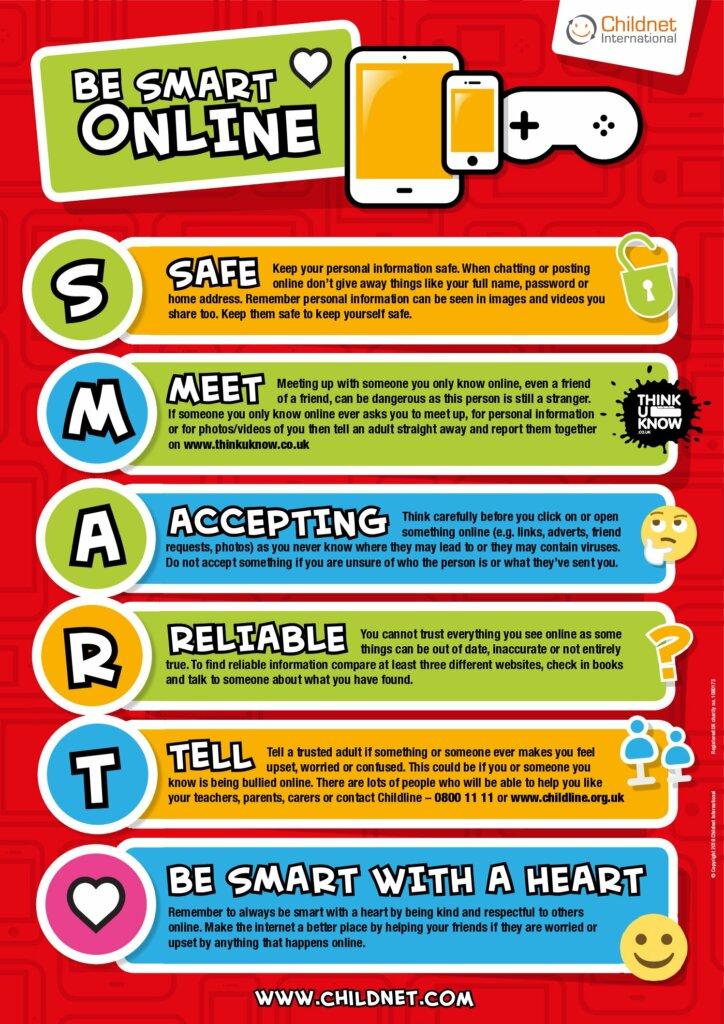
Pupils at St Peter’s use the internet regularly to support, enrich and enhance their learning. We recognise the importance of developing strong e-safety awareness and promoting safe, responsible and respectful online behaviour. Throughout the school, we aim to equip children with the knowledge, skills and understanding they need to navigate the digital world confidently, make informed choices and keep themselves and others safe online. We aim to teach children to:
- about the impact of cyberbullying and what to do if they have been affected.
- to be vigilant when communicating online, recognising that people may not always be who they say they are and to be sensible about what they share
- to tell an adult they trust if something is upsetting them
- to question the reliability of information given through a web-based source
- to search responsibly for information while using internet browsers.
This page has some tips and ideas to support you in helping your child manage their online behaviour and links where you can get more advice if you are worried or would like to know more.
Below are a list of useful websites, advice and resources that you may find helpful when navigating the issue of online safety with your child.
Useful resources and links
Click for Internet Matters leaflet - A comprehensive web resource with a wide array of tips and advice on how to navigate the online world with your child.
Click for NSPCC Keeping Children Safe – The NSPCC are the first to admit that the internet is amazing. Children can play, learn, create and connect – opening up a whole world of exciting possibilities. But with the digital world changing all the time, how can you make sure your child stays safe? Whether you’re an online expert or you’re not sure where to start, their tools and advice will help you keep your child safe.
Click for Childnet website - Childnet International is a registered UK charity that aims to make the internet a safe place for children and young people. Packed with resources, it is a great resource for parents.
Click for Child Exploitation and Online Protection website - Child Exploitation and Online Protection (CEOP) is part of the National Crime Agency and their website can be used to report if you are worried about online abuse or the way someone is communicating online.
Click for Gov.uk Kids Online Safety campaign - Gov.uk Kids Online Safety Campaign offers tips on how to help your child think carefully about online content, along with offering advice on what to ask your child to help them stay safe. There is also a short quiz for you and your child to take, to learn how to spot misleading or unreliable information online.
Click for Net Aware website - The number of apps and social media channels your child could be exposed to grow all the time, as does an app's functionality. We recommend you visit Net Aware to read the latest and most current advice on over 70 apps to ensure you know what they do, how you can limit their features as well as recommended age restrictions.
BBC Teach Primary Online Safety Videos - Aimed at ages 7–11, this collection features short animated clips covering screen-time balance, online spending, and health misinformation.
Switched on to privacy | ICO - Help setting up privacy on devices for parents.